Subscriptions
If you would like to be regularly informed about performed changes, you can create subscriptions for various objects - for example, sections, folders, and maps in the documentation. All activities selected by you are logged and sent at predefined intervals to a defined e-mail address. This e-mail is only sent after the expiration of the selected time window if your settings regarding changes have occurred within this period. For each event in the list, the e-mail contains a PTS link to directly access the corresponding object. For subscriptions to new or released (CAD) documents, additional links are provided in the e-mail to directly obtain a download list of all corresponding (CAD) documents.
To create a subscription, select the action  .
.
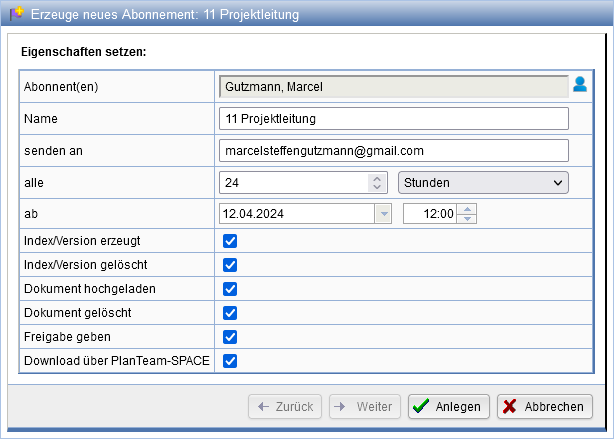
If desired, change the pre-selected values and set the events for which you wish to be informed. The selection depends on the respective object and component. Here, you select the date when the subscription starts and the interval in which a notification is sent.
If you possess the Role Project Manager or Communication Manager, you receive
the opportunity via the action to select the subscriber from the list of project members. Otherwise, the creation of the subscription always occurs for yourself.
If a section or folder has a subscription, it is marked in its action bar with the symbol
to indicate it. To change an active subscription, click on this symbol.
An overview of all active subscriptions is available in the Message Center or via the corresponding menu item in the personal actions.