CAD references and links to documentation
CAD References and Links
CAD References represent CAD documents that are opened together with the main document during processing. These are typically located in the indexes of their own project folders.
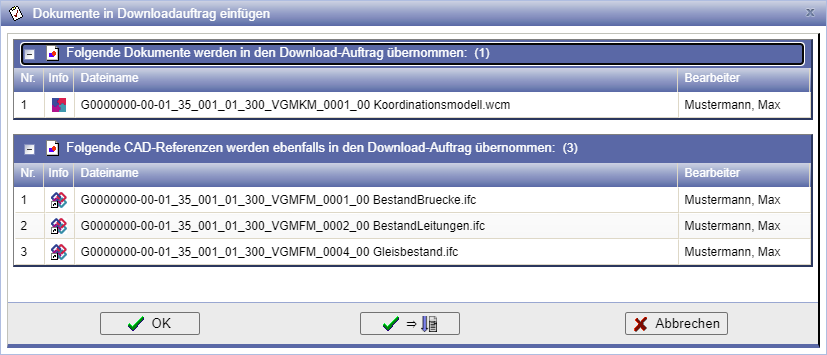
Documents referenced via the AutoCAD application in a CAD document (XRef) can be CAD Referencesto be inserted. When downloading via the Download Order will these be downloaded and displayed in the main file upon opening.
Links are references to documents or CAD documents located elsewhere in the documentation but related to the current object. Unlike CAD references, these are not opened during editing.
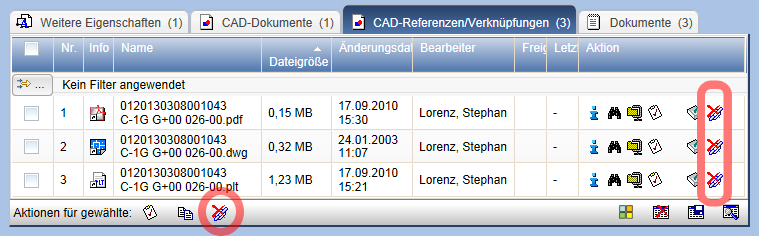
Whether CAD references or links are present is displayed on the properties pages. The representation in indices occurs in the list CAD References/Links.
The icons for CAD references and links are marked with a special indicator.
CAD references and links are as on the page Documents copy/move described. When inserting, select the setting Insert documents as link/CAD reference.
When copying or moving (CAD) documents, CAD references can be copied/moved. The link between the objects is then automatically restored.
With the action links will be removed from the table. This action is available as a single or multiple selection.
Check References and Links
Whether a document/CAD document is referenced in another document or a link has been set from another document can be determined with the function Display CAD References/Links be checked. To do this, click the button
in the menu bar of the document/CAD document.

All references and links are displayed in an overview below the properties window.

Download References
When inserting (CAD) documents into the download order CAD references are also inserted if available.