Favorites
Via the symbol you can
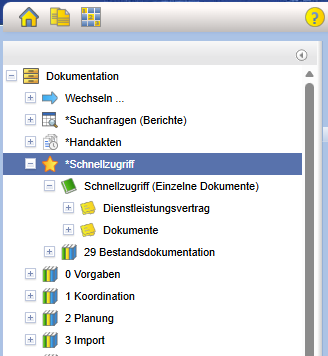
add various objects to Favorites. Favorites are additionally entered in the node *Favorites
in the documentation tree. This allows frequently used
objects to be opened quickly. Individually long paths through the
tree structure can be shortened.
You can also subscribe to Favorites by clicking on the designation Favorites
and then selecting the action Create a Subscription...
on the right side.
Here, a subscription is simultaneously created for each of the favorited folders,
provided that one does not already exist for the respective folder.
If you want to remove the object from Favorites again, click on . The corresponding object will
be removed from Favorites again. Any subscription that may have been created remains intact.