Dashboard
Topics
General
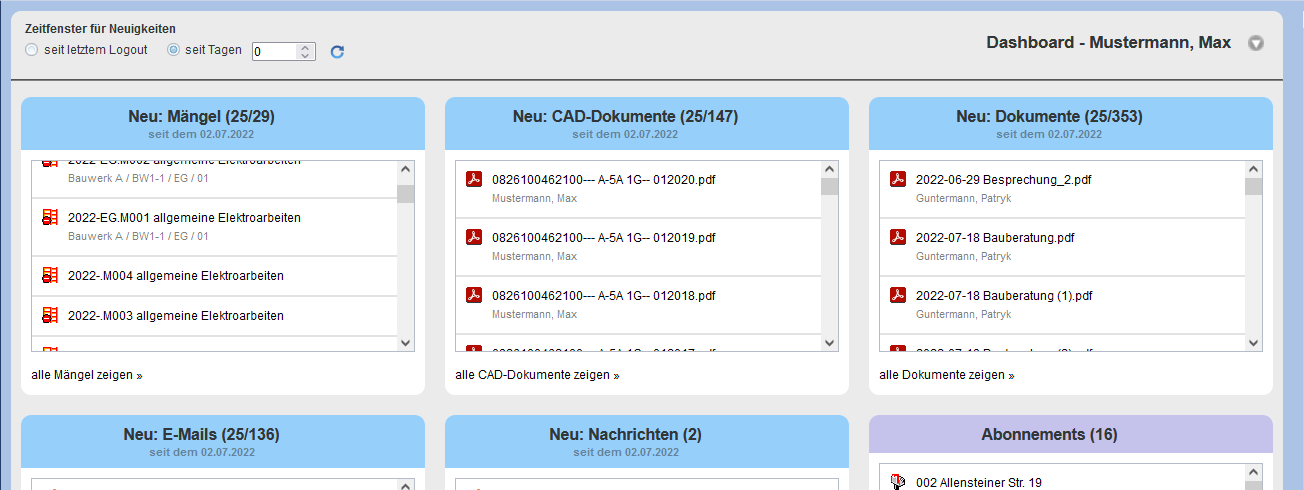
The Dashboard provides an overview of current information relevant to the user.
Information in the Dashboard is organized in tiles, where the arrangement and display of the tiles can be set individually. The content of the Dashboard depends on the context.
Content
Depending on the configuration, the following content can be displayed in the Dashboard across projects:
| Message Center |
| New Messages |
| New Emails |
| Subscriptions |
| Documentation |
| New Documents |
| New CAD Documents |
| Defects/Incidents |
| New Defects |
| Other |
| Quick Start Guide |
Adjust Display
The composition, arrangement, size, and color of the tiles in the Dashboard can be configured individually. The easiest way to change the order is to drag a tile to the new position using Drag&Drop.
The menu for adjustment is located at the top right of the Dashboard. Via this menu, empty tiles can be hidden, or the number of entries in the tiles can be set individually.
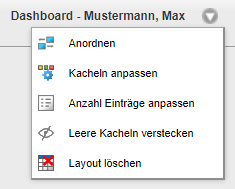
The following actions are available here.
 Arrange Arrange |
This automatically arranges the tiles. |
| Here you can select the desired tiles. | |
| Here you can select the maximum number of lines per tile. | |
| Empty tiles can be shown or hidden as needed. | |
| The current layout is reset here. |